|
PHP Tricks
Want to do cool things with PHP without reading the full manual?
Here are a few tips and tricks (listed from the most simple to the more complicated)
Display the date and time
Redirect to another page
Return an image instead of HTML
Save bandwidth
Display currencies
Show the request header
Ignore User Abort
Error reporting
Create an image on the fly with the GD library
Get the Apache version
Send an email from PHP
Hide PHP Usage
Expose Hidden PHP Execution & Hide PHP Better!
Here are various ways to display the date.
<?
/* Today is June 9, 2026, 4:23 am */
$today = date("F j, Y, g:i a");  // June 9, 2026, 4:23 am
$today = date("m.d.y");          // 06.09.26
$today = date("j, n, Y");        // 9, 6, 2026
$today = date("Ymd");            // 20260609
$today = date("D M j G:i:s T Y");// Tue Jun 9 4:23:42 CEST 2026
$today = date("H:i:s");          // 04:23:42
?>
|
See the full description of the date() function parameters on the PHP.net website.
<?
header("Location: http://www.google.com/");
exit(0);
?>
|
<?
$imageFileName='hello.gif';
header("Content-type: image/gif");
readfile($imageFileName);
?>
|
If you're want to use a jpg (resp. png) image, you must also change the 'image/gif' content-type into 'image/jpeg' (resp. 'image/png').
Add the following code at the beginning of your PHP page, and PHP will automatically
compress the page to web browsers that support with feature (both Internet Explorer and
Mozilla/Firefox do).
Since HTML can easily be compressed, you can expect to cut down by at least 2/3
the bandwidth used at the expense of some extra load on the server's CPU, but the CPU load
difference usually isn't even noticeable.
<?
@ini_set('zlib.output_compression_level', 1);
@ob_start('ob_gzhandler');
?>
|
Sometimes we must display a number as a money amount, but we can know what's the correct
way to display each possible currency. Nevermind, PHP will do that for you:
<?
$number = 1234.56;

// USA (USD 1,234.56)
setlocale(LC_MONETARY, 'en_US');
echo money_format('%i', $number);

// France (1 234,56 EUR)
setlocale(LC_MONETARY, 'fr_FR');
echo money_format('%i', $number);

// Brazil (1.234,56 BRL)
setlocale(LC_MONETARY, 'pt_BR');
echo money_format('%i', $number);

// Great Britain (GBP1,234.56)
setlocale(LC_MONETARY, 'en_GB');
echo money_format('%i', $number);

// Japan (JPY 1,235)
setlocale(LC_MONETARY, 'ja_JP');
echo money_format('%i', $number);
?>
|
We occasionaly want to see very exactly what the browser sent to the webserver. Here's
an easy way to do it:
<?
$headers = apache_request_headers();
foreach ($headers as $header => $value) {
  echo "$header => $value <br>\n";
}
?>
|
This code should print something like this.
Your script is doing something sensible (database updating, ...) and you absolutly don't
want it to be interrupted by the user pressing the 'Stop' button of his browser?
Just add the following code to your script:
<?
ignore_user_abort(true);
?>
|
Depending on whether you're programming/debbuging or installing a script on a production server,
you may want error reporting more or less verbose.
Here's how to change it:
<?
// Disable all error reporting
error_reporting(0);

// Default configuration
error_reporting(E_ALL ^ E_NOTICE);

// Display extra warnings about uninitialised variables, etc
error_reporting(E_ALL);
?>
|
Look at the error_reporting() function manual.
We already know how to return an already made image; here's how to create an image
on the fly:
<?
header ("Content-type: image/png");
$im = @imagecreate (150, 50)
   or die ("Couldn't create image!");
$background_color = imagecolorallocate ($im, 205, 205, 255);
$text_color = imagecolorallocate ($im, 233, 14, 91);
imagestring ($im, 2, 5, 5,  "A Simple Text String", $text_color);
imagepng ($im);
imagedestroy($im);
?>
|
The code above will create the following image: 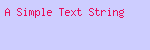
See the PHP Image Manual to learn more about these cool image generating functions.
Which Apache version are we using? Here's a quick way to find out:
<?= apache_get_version(); ?>
|
It will print something like this:
Apache/1.3.31 (Debian GNU/Linux) mod_throttle/3.1.2 PHP/4.3.9-1
You may want to send emails directly from your PHP code, for example to send a confirmation to a user who just registered with your service, or email you if the script encounters a critical error.
<?
mail("recipient@example.com",
    "email subject",
    "Body of the message",
     "From: webmaster@mydomain.com\r\n");
?>
|
The last parameter is optional. See the manual of the mail() function.
You may not want other people to know that you are using PHP... Here are 2 easy ways to hide the fact you're using PHP.
Trick 1
Use another extension than .php for your PHP files... your can use .foo, .blabla, .asp or even .htm and .html (in the later case, PHP parses all the files ending in .html, but it will work fine of course if some of these files are plain HTML; slowdown for parsing plain HTML is not noticeable even on the highest loads thanks to PHP's cache).
This can be done easily by adding the following line to the .htaccess file in the same directory than your code:
|
AddType application/x-httpd-php .foo .blabla .asp .htm .html
|
Trick 2
You may also got with extension-less filenames and ask Apache to consider them as PHP code.
Just add this to your .htaccess:
# All extension-less files are PHP code
<Files ~ "^[^\.]+$">
ForceType application/x-httpd-php
</Files>
# Only consider 'index' as PHP code
<Files index>
ForceType application/x-httpd-php
</Files>
|
Here's yet another way to do the same thing (to be added to the .htaccess too):
Warning: enabling MultiViews has many other side effects.
See the Apache Content Negociation page for more information.
But please read the next trick to hide your code better...
Adding ?=PHPB8B5F2A0-3C92-11d3-A3A9-4C7B08C10000 at the end of the URL of PHP scripts will expose the PHP credits.
Setting expose_php to Off in php.ini prevents this.
Or add the following code to your script:
<? ini_set("expose_php", "Off"); ?>
|
This will also remove the X-Powered-By: PHP/x.y header that PHP overwise automatically adds to every response header.
|
